Using ClientSim Net
Networked code is not done until it passes the test scenarios in Play mode with at least two remote players.
Mental model
- One Unity editor, one world copy per player. Each remote puppet gets a hidden scene
NetSim World <name> [id], loaded when they join. Their copy changes only through the network (synced variables, network events, ObjectSync, ownership). Anything not synced stays different, as in VRChat. - Everything crossing the wire goes encode, bytes, delayed queue, decode.
RequestSerializationfrom a non-owner is dropped with a warning.- Events:
Allruns locally and sends;Othersnever runs locally;Ownerruns locally only if you own the object;Selfis local only. - Late join: untick ClientSim's Local Player Is Master before Play. The remote master then sends every synced behaviour's state shortly after the network settles.
Scripting
Drive the simulator from code with NetSimApi, or with the clientsim_net unity-mcp tool. See Scripting and unity-mcp.
Net Debugger
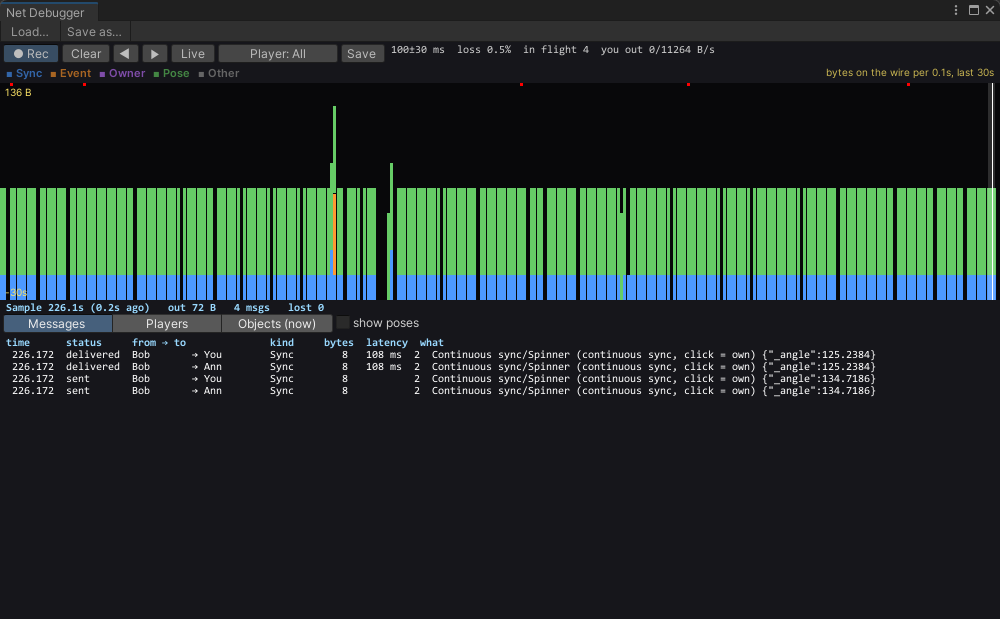
The Net Debugger shows a 30 s timeline of bytes on the wire per 0.1 s, stacked by kind (Sync, Event, Owner, Pose). Click or drag to select a sample; the tabs below list its messages (sender, receiver, size, latency, payload), per-player totals and per-object state. Red marks a limit hit, a lost message or an object out of sync; CLOGGED means your outbound traffic is over ~11 KB/s. Save writes Library/ClientSimNet/netstats-<time>.json, which Load… reopens later, even outside Play mode.
Test scenarios
Run the test scenarios that apply to your feature.
Known limits
- Sync sizes are an estimate per type, not real wire bytes.
- Player APIs other than
TeleportTo(Immobilize, SetWalkSpeed, …) on a puppet do nothing. - Remote Udon
Physics.Raycastqueries your scene; the puppet's body is not in its own world. VRCInstantiatespawns land in your scene. (PlayerObjects get their own copy in every world since 0.1.2.)- No
VRCObjectPoolspawning by puppets: take ownership of the pool object instead. - SDK internals are reached by reflection. After an SDK update, run Test Runner > EditMode > ClientSimNet.Tests first.