Runtime and builds
Documentation version: 0.2.0
The editor stack is baked and stripped by default. Version 0.1.1 adds automatic GPU modifier conversion and shared physics components that run in VRChat or standalone projects.
| Workflow | VRChat Worlds SDK project | Standalone without the SDK |
|---|---|---|
| Static editor stack | Baked mesh; components stripped | Same by default |
| Runtime GPU modifiers | Generated BlendUdonDeformStack | Native component; leave Keep at Runtime off |
| Full scripted stack | Not available in Udon | Keep at Runtime + RebuildNow() |
Physics components under Udon/ | UdonSharp callbacks | Native MonoBehaviours, LateUpdate and AsyncGPUReadback |
| Synced Panel / Network Event | VRChat integration | Local actions only; no multiplayer/pickup system installed |
Requires Unity 2022.3+ and com.unity.ugui 1.0.0. GPU features need compatible graphics hardware; supplied rendering shaders target the Built-in pipeline. URP/HDRP can use baked modifiers and CPU deformation, but do not assume the supplied simulation renderers are compatible.
Runtime GPU modifiers
- On Wave, Simple Deform, Lattice, Hook or Warp, set Runtime > GPU.
- Put live modifiers at the bottom of the stack. They execute after baked modifiers, in their own stack order.
- Enter Play Mode/build. Conversion ships a base mesh without the live operations and adds
BlendUdonDeformStack. - Animate Wave Time, Simple Deform Origin, Hook Target, Warp From/To or Lattice points.
There are at most 8 live operations per mesh, one live Lattice, and at most 8 × 8 × 8 cage points. The cage must have exactly U × V × W children. Wave Along Normals and Warp Preserve Volume are not live options.
The generated component is not an Inspector reference before conversion. Get it from the target GameObject at Start, then use FindOp("Wave"), SetFloat(op, "height", value), GetFloat, SetBool or GetBool. Use the modifier's actual name. Unknown names/indices do nothing; settings re-deform on the next frame.
GPU output is copied back to the mesh via asynchronous readback, allowing its existing material to remain. The image can lag the simulation by one or two frames. This is not the old CPU-only, roughly 1,000-vertex workflow.
Wave: Editor setup to local Play Mode
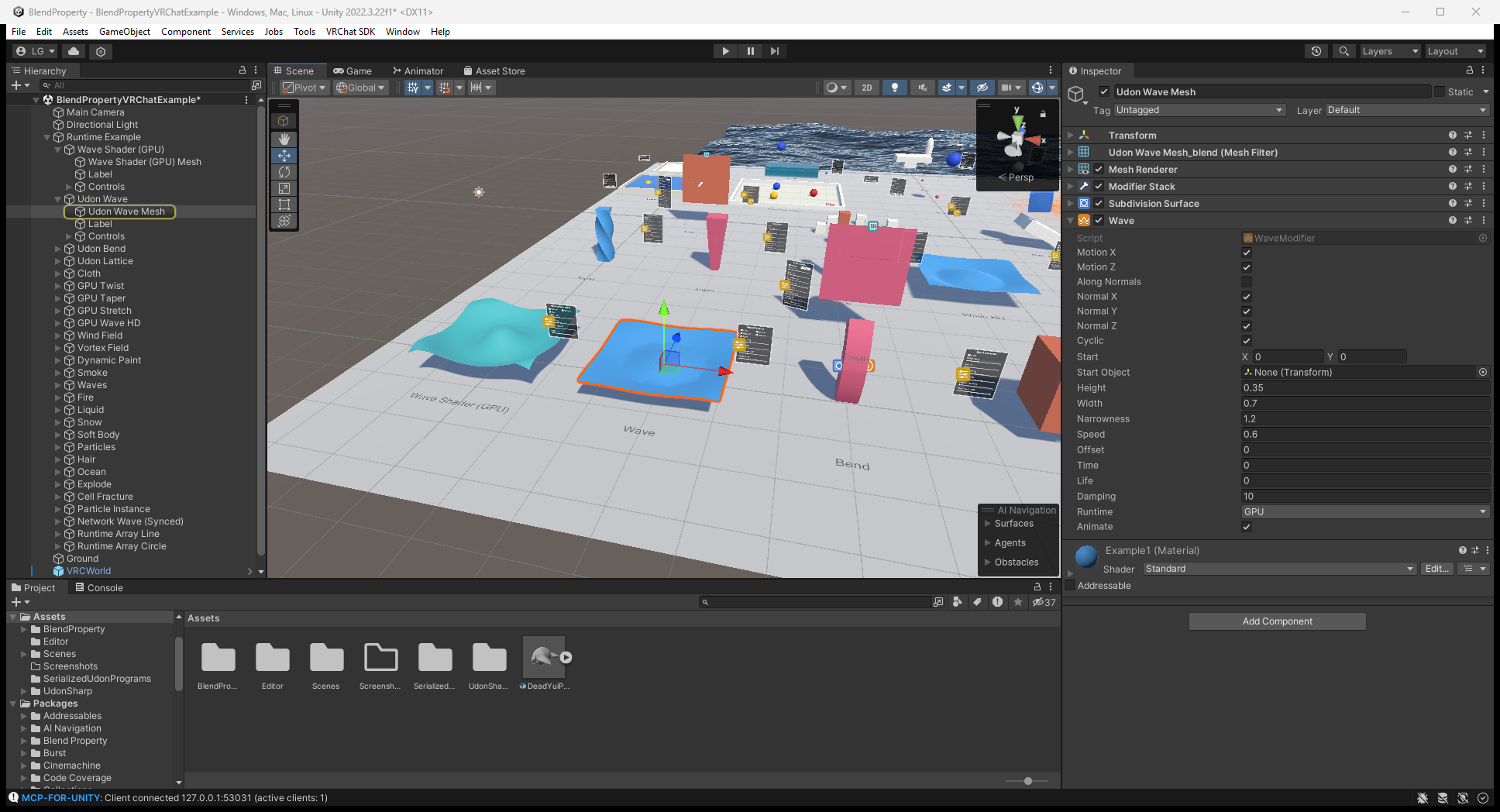
Open the VRChat example, select Runtime Example/Udon Wave/Udon Wave Mesh, and check Runtime: GPU on Wave. The first image shows the Editor setup, including Height and Speed.
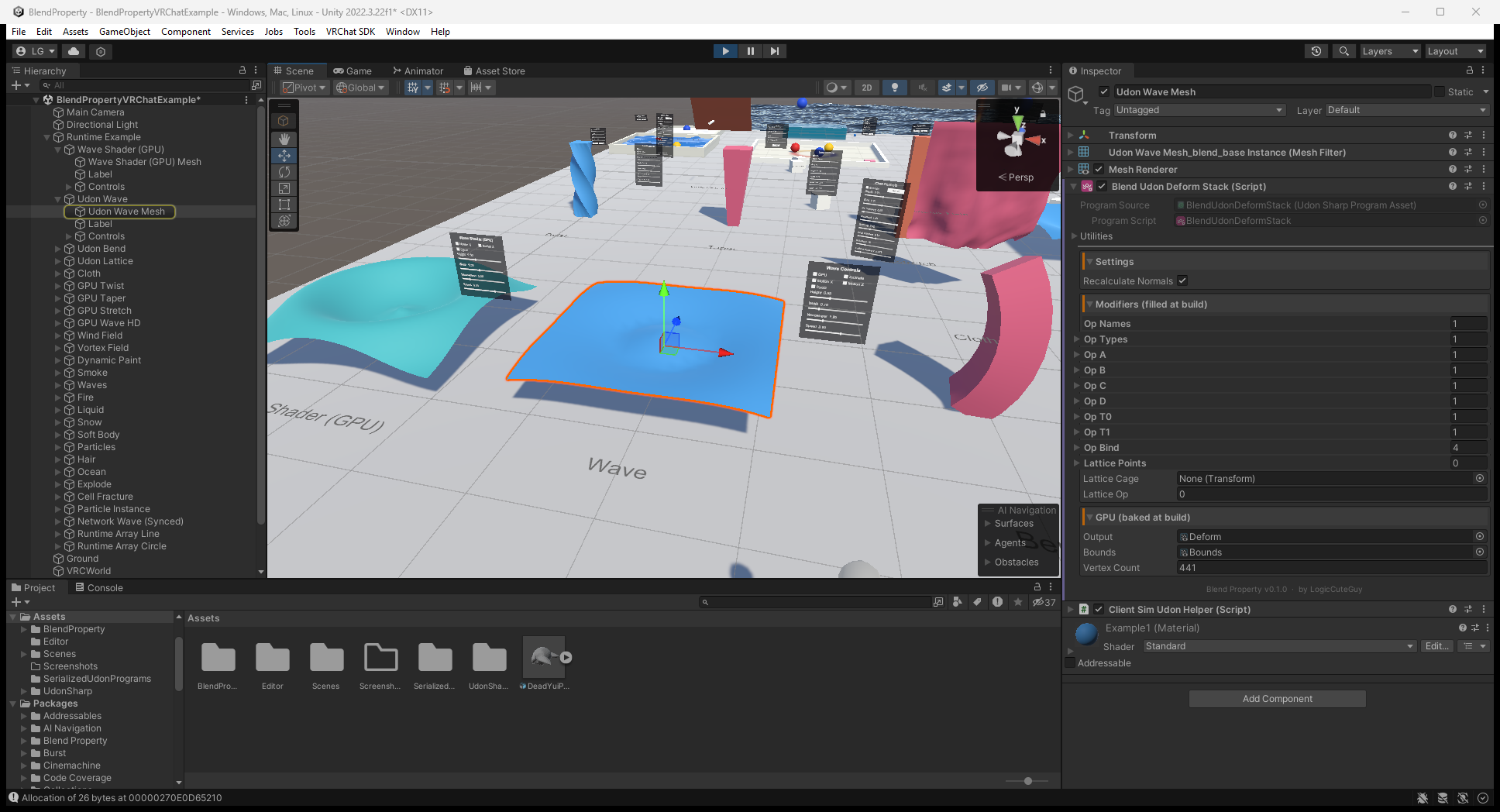
After entering Play Mode, the upstream ClientSim capture shows the generated Blend Udon Deform Stack and the deformed plane. Use this frame to identify the converted component, not as proof of remote synchronization or device support.
Standalone full-stack control
For general C# changes, enable Keep at Runtime on the stack and Read/Write on the source mesh:
var stack = GetComponent<BlendProperty.BlendModifierStack>();
stack.GetComponent<BlendProperty.ArrayModifier>().count = level + 2;
stack.RebuildNow();
Each call evaluates the full stack into a reused scene-only mesh and updates a MeshCollider using the old result. Avoid heavy stacks in Update. Keep at Runtime leaves the stack under your script's control and does not also install a GPU deformer. VRChat always strips the full stack.
Runtime Array example
The main VRChat scene has Line/Circle Array stations using BlendUdonRuntimeArray. Set count, circle, spacing or radius, then call Generate(). This small CPU generator is not the editor Array stack: one readable triangle submesh, normals/UV0, 32 copies, 65,535 output vertices, and no generated collider. Panels share settings; each client generates its mesh. It is an example workflow, not an Add Component menu item.
Examples and checks
Example/VRChat/BlendPropertyVRChatExample.unity: GPU modifiers, Array, cloth/soft body, fluid, hair, particles, paint/waves, destruction, ocean and controls.Example/Standalone/BlendPropertyStandaloneExample.unity: full-stack rebuild examples. Shared physics components also work natively in standalone; the scene is not a copy of every VRChat station.- Physics and interaction: bake commands, material limits, input and synchronization.
- Illustrated runtime stations: settings, actions and expected results.
If a stack disappears in a VRChat build, use Runtime GPU rather than Keep at Runtime. Missing GPU output needs the correct bake, readable source, graphics support and pipeline checks. The docs build does not run Unity or validate two-client synchronization.
0.2.0 fixes VRChat panel compatibility: Control Panel and Cloth Panel now use NoVariableSync, so they can share a GameObject with the Manual Synced Control Panel. It also corrects the shader references in the example's baked GPU deform textures and refreshes the VRChat scene. Existing GPU/native physics features remain available.
For upgrade checks, see panels and copied example assets.