Modifiers and limits
Documentation version: 0.2.0
Set up a stack first. Modifiers run in component order; changing order changes the result.
| Group | Modifiers |
|---|---|
| Generate | Array, Bevel, Boolean, Decimate, Mirror, Remesh, Screw, Solidify, Subdivision Surface, Triangulate, Weld, Wireframe |
| Deform | Cast, Curve, Displace, Hook, Laplacian Smooth, Lattice, Shrinkwrap, Simple Deform, Smooth, Warp, Wave |
| Edit | UV Project, UV Warp |
| Normals | Smooth by Angle, Weighted Normal, Normal Edit |
Choosing a modifier
- Array supports Line, Circle, Curve and Transform layouts, with copy rotation/scale, randomization and merging.
- Bevel supports edge/vertex cuts, width modes, angle limits, segments and profiles. Vertex mode is a flat cut and ignores Segments.
- Boolean supports Intersect, Union and Difference with one object or meshes under a collection object. Hide the cutter's MeshRenderer yourself.
- Simple Deform provides Twist, Bend, Taper and Stretch. Wave with Runtime Off is baked at a fixed time; use the runtime alternatives for motion.
- Remesh provides Blocks, Smooth, Sharp and Voxel modes. Thin parts smaller than a voxel can disappear.
For full option lists, use the version-pinned README.
Bevel before and after
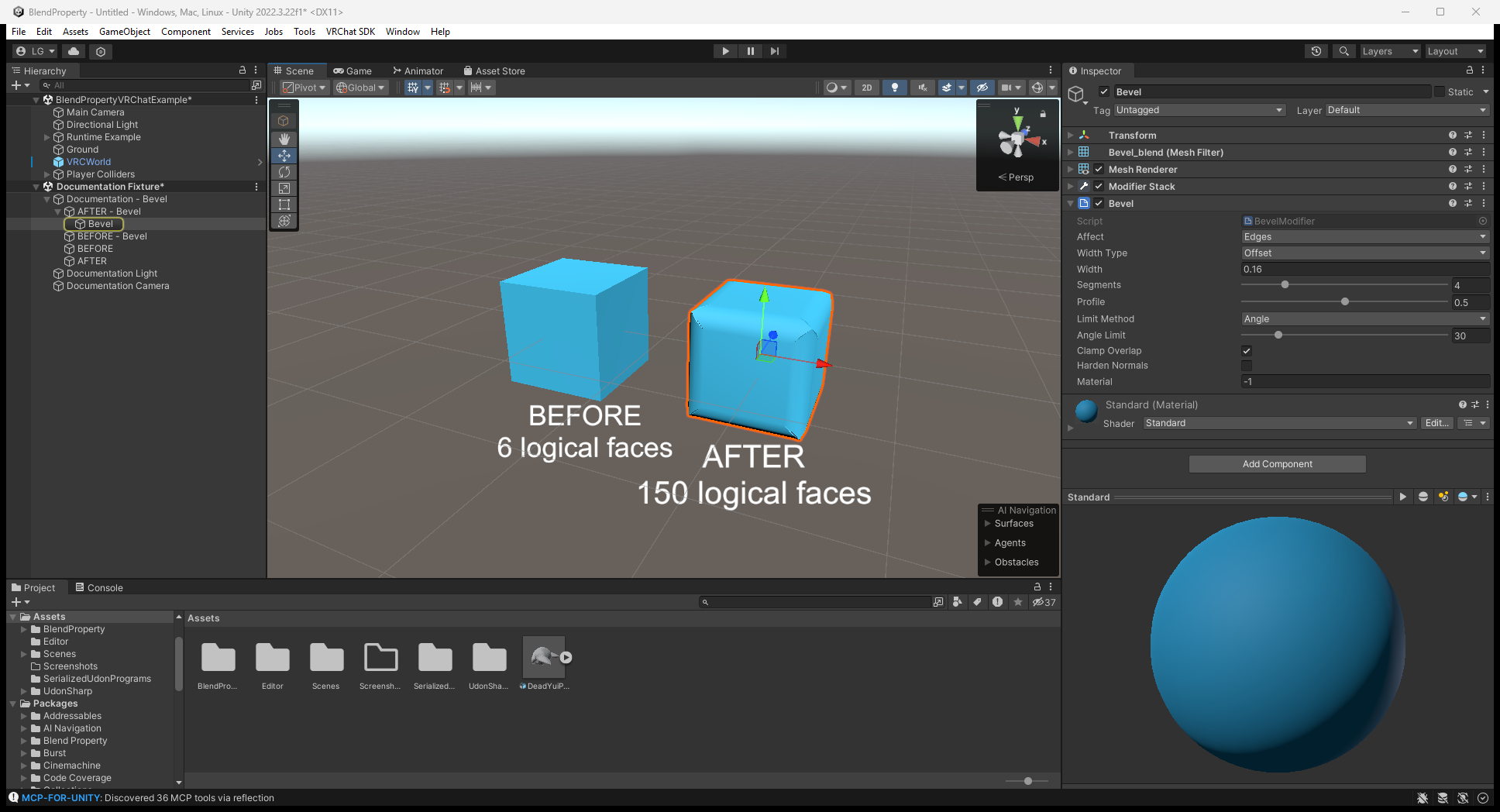
In the Editor, select Bevel and compare the source cube on the left with the rounded result on the right. This example uses Affect: Edges, Width Type: Offset, Width: 0.16 and Segments: 4; adjust Width for your mesh's size.
Lattice setup
- Add Blend Property > Modifiers > Lattice Object to an empty GameObject.
- Move/scale it around the mesh; set Resolution U / V / W (default 2 × 2 × 2).
- Add Deform > Lattice to the mesh and assign the cage.
- Select the cage and drag Scene-view points. Reset Points restores the cage.
Lattice interpolation is trilinear. Boolean, Hook, Lattice, Curve, Shrinkwrap, Warp and object-driven Mirror/Array/Screw read other transforms; moving dependencies rebuilds the editor stack. Reset Hook in the ⋮ menu rebinds Hook.
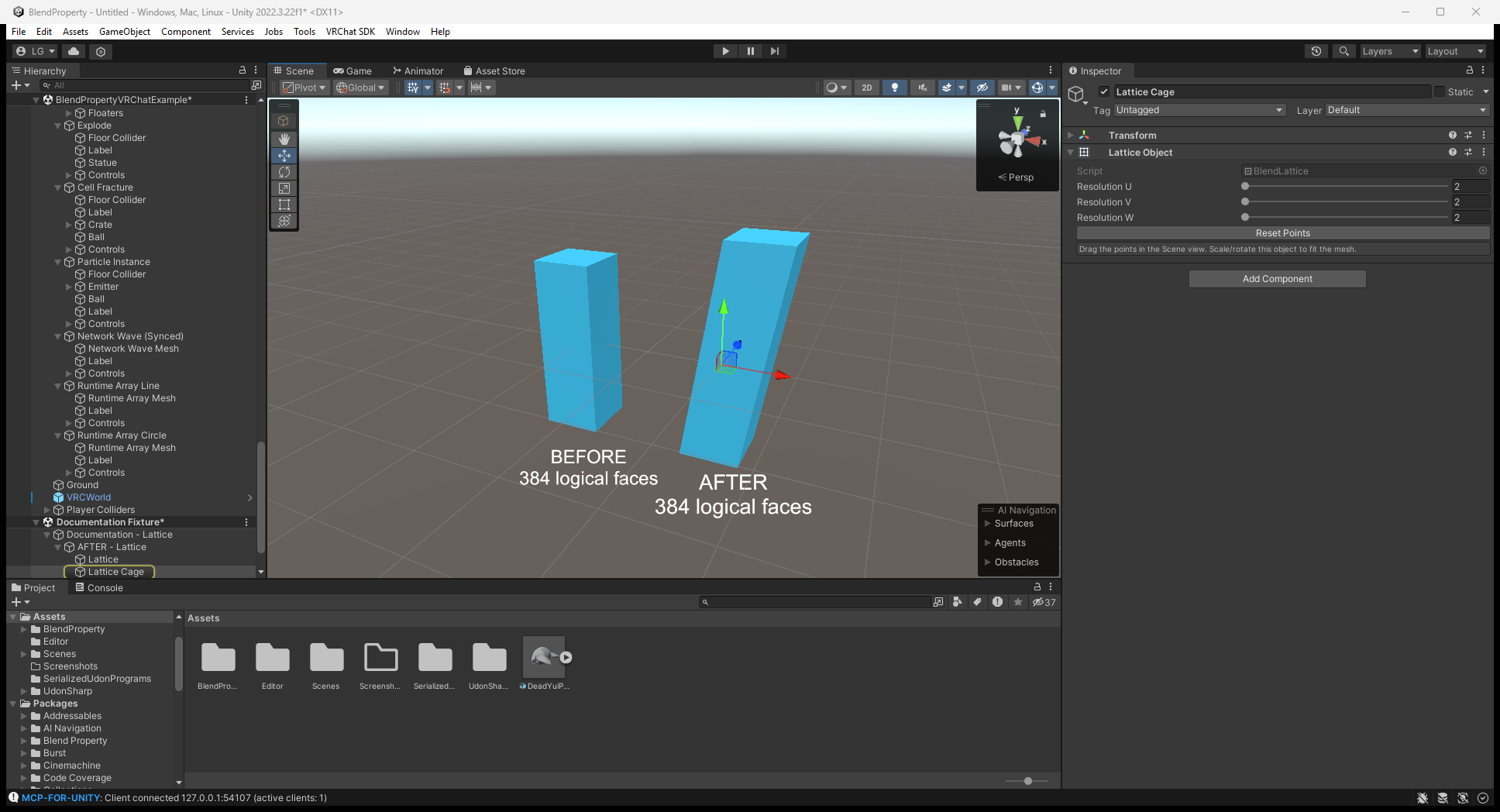
The Editor capture below shows a 2 × 2 × 2 Lattice Object and the resulting leaning column. Select the cage to edit its points; select the mesh to assign the cage to its Lattice modifier.
Units and axes
Distances use scene metres: Bevel width 0.02 means 2 cm even on a scaled imported mesh. Percentages, factors, angles and UV values are not distances. Plain distances on non-uniformly scaled objects use average axis scale; offsets use per-axis scale.
Unity is Y-up, Z-forward. Blender operations that default to Z-up (circle Array, Wave, Cylinder Cast, Simple Deform, Screw) use Y here. The GPU Wave shader instead uses mesh-local units.
Known limits
- MeshFilter only; no skinned meshes, bones, blend shapes or vertex groups.
- No crease/bevel-weight/face-strength features, Exact/Self Intersection Boolean, Solidify Complex, Decimate Symmetry, Shrinkwrap Target Normal Project or Remesh Adaptivity.
- Boolean uses BSP CSG: closed meshes, slow beyond a few thousand faces, and T-junctions can remain on cut edges.
- Bevel uses triangle-fan corner caps, not Blender's patch grid.
- Decimate uses greedy QEM. Un-Subdivide only changes all-quad meshes produced by subdivision.
- Shrinkwrap checks target triangles; large targets are slow. UV Project has one orthographic projector.
- Remesh uses an inside/outside grid, not a distance field, capped at 192 voxels per axis.
- Hook affects everything within its radius rather than a vertex group.
Only the changed editor-stack portion rebuilds. A rebuild exceeding 80 ms waits until mouse release; this is an editor responsiveness rule, not a runtime frame budget.
Array, Splines and live modifiers in 0.1.1
Array Curve and Curve can follow Transforms or an optional Unity Splines SplineContainer. Split Copies creates Array Copy N children sharing the final mesh, with later modifiers evaluated per copy. Collider Per Copy adds child BoxColliders for a compound Rigidbody shape; it is distinct from the collider-free runtime Array example.
Wave, Simple Deform, Lattice, Hook and Warp expose Runtime > Off / GPU. Keep GPU operations at the end of the stack. Conversion supports at most eight operations, one Lattice and 512 cage points. Wave Along Normals and Warp Preserve Volume are not live. See runtime conversion rather than adding the old separate Wave/SimpleDeform/Lattice components.
Illustrated modifier tutorials cover settings and before/after results.