BlendProperty
Documentation version: 0.2.0 · Release
Blend Property (com.logiccuteguy.blendproperty) adds Blender-style modifier components to Unity objects with a MeshFilter. Components run top-to-bottom, preview in the editor and save the result as a mesh asset. By default, builds contain the baked mesh, not the stack.
Requires Unity 2022.3 or newer. ProBuilder support is optional and activates when ProBuilder is installed. SkinnedMeshRenderer, bones and blend shapes are not supported. See modifier reference and runtime/build behavior.
What's fixed in 0.2.0
0.2.0 fixes VRChat panel compatibility: Control Panel and Cloth Panel now use NoVariableSync, so they can share a GameObject with the Manual Synced Control Panel. It also corrects the shader references in the example's baked GPU deform textures and refreshes the VRChat scene. Existing GPU/native physics features remain available.
What's new in 0.1.1
0.1.1 adds live GPU modifiers, cloth/soft body, fluids, hair, particles, paint/waves, destruction, ocean and interaction. Shared components now run natively without the Worlds SDK. Array/Curve accept optional Unity Splines; Array adds Split Copies and Collider Per Copy. Runtime controls can be shared without replicating full GPU simulation state. See runtime/builds and physics/materials.
Installation
In Window > Package Manager > + > Add package from git URL, enter:
https://github.com/LogicCuteGuy/BlendProperty.git#v0.2.0
Alternatively place the tagged repository at Packages/com.logiccuteguy.blendproperty, or extract the named com.logiccuteguy.blendproperty-0.2.0.zip from the release into that folder, with package.json at its root.
VCC/ALCOM: add or refresh the LogicCuteGuy VPM listing (https://vpm.logiccuteguy.com/index.json), then add Blend Property 0.2.0 to the project. The listing publishes the same named ZIP as GitHub Releases. The package declares com.unity.ugui 1.0.0; VRChat runtime deformers require a Worlds SDK project with stock UdonSharp or LCGUdonSharp.
Build your first stack
- Select a primitive, an FBX mesh child or a ProBuilder object with a MeshFilter.
- Choose Add Component > Blend Property > Modifiers and a modifier under Generate, Deform, Edit or Normals. The first adds a Modifier Stack automatically.
- Add more modifiers. Drag headers or use the ⋮ Move Up/Down / Move to First/Last menu to change order.
- Toggle a modifier's checkbox to preview without it. Disabling the stack shows the original mesh.
- Set Shading on the stack: Smooth By Angle, Smooth, Flat or Keep Imported.
Rebuild forces an update after the source mesh changes. Apply in a modifier's ⋮ menu bakes it and every enabled modifier above it into the source. Apply All bakes the whole stack and removes modifiers. Remove All restores the original without applying, in one Undo step. GameObject > Blend Property > Modifiers > Apply All in Children / Remove All in Children operates on a whole model.
Baked results live in Assets/BlendProperty/Baked/; keep assets still referenced by MeshFilters. Tools > Blend Property > Delete Unused Baked Meshes removes unused results.
Editor walkthrough
Select the mesh to find Modifier Stack in the Inspector. Here the source cube is on the left and the Bevel result is on the right; Add Modifier, Apply All, Remove All and Rebuild are on the stack.
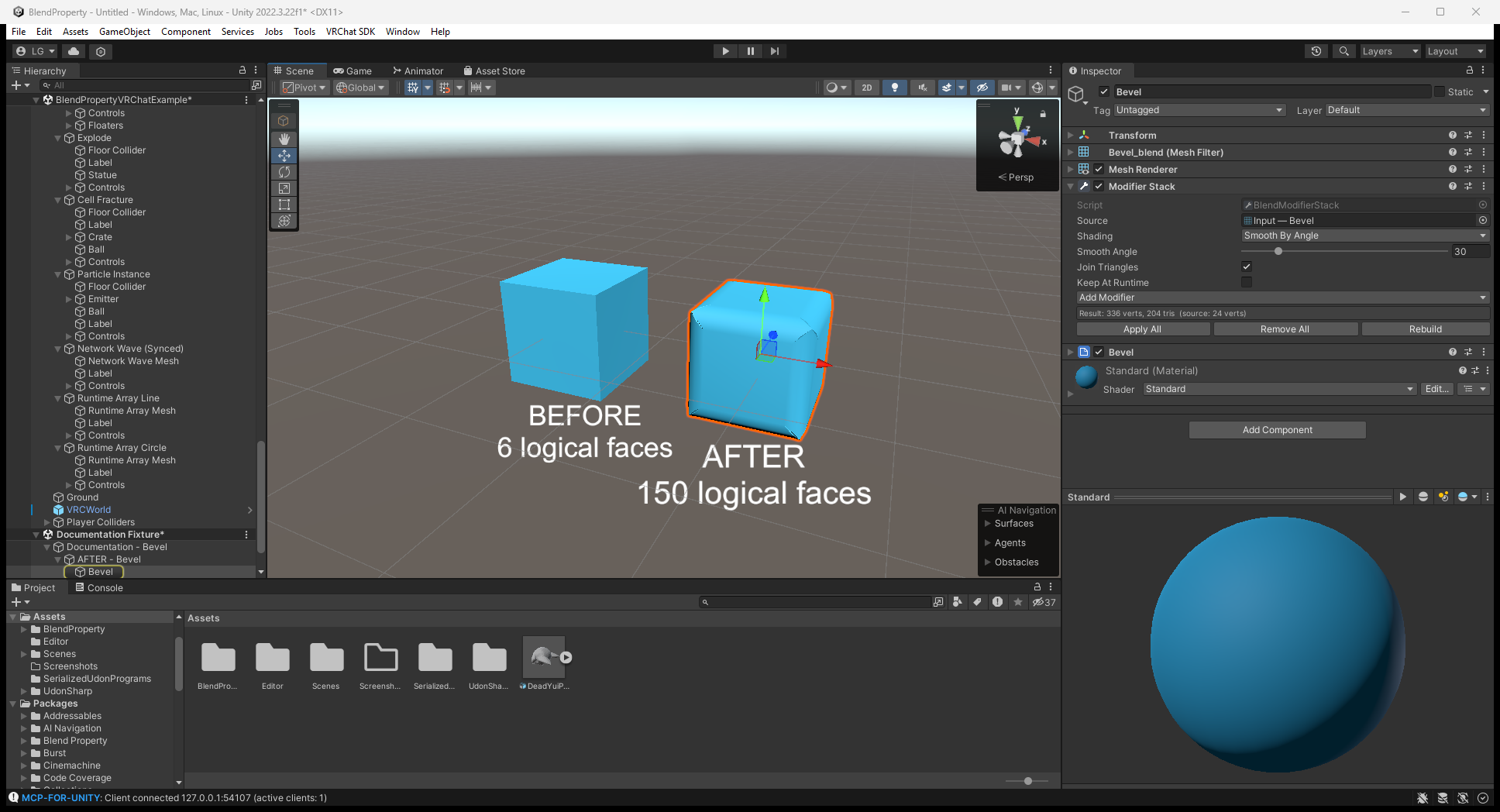
View full size. Images are reused from the tagged upstream guide; some Inspector version labels predate 0.2.0. Editor setup and local ClientSim results are labeled separately below.
Examples
Scene under Example/ | Purpose |
|---|---|
BlendPropertyExample.unity | Ten editor stacks (including two Unity Splines examples): Bevel/Subdivision, line/circle Array, Simple Deform, Wave, Boolean, Wireframe and Lattice |
VRChat/BlendPropertyVRChatExample.unity | GPU modifiers, physics stations, Runtime Array and shared panels; open in a VRChat project |
Standalone/BlendPropertyStandaloneExample.unity | Array count and Twist angle driven by RebuildNow(); open without the VRChat SDK |
The editor example arrives without baked meshes; opening it rebuilds and saves results. Copy Git-installed example folders into Assets before saving edits to read-only package files. Wrong-project runtime examples can show missing scripts.
ProBuilder
Stacks stay live while the shape is edited. Vertex/edge/face selection shows the unmodified cage; Apply writes the result into the ProBuilderMesh so it stays editable.
Source and license
Repository · Version-pinned user guide · MIT license
After the first modifier, the stack's Add Modifier button lists Generate / Deform / Edit / Normals. Physics setup uses Blend Property > Physics > Physics Tab; see physics. For pictured steps use the illustrated workflow.