Runtime และ build
เวอร์ชันเอกสาร: 0.2.0
ค่าเริ่มต้น Editor bake stack แล้ว strip component รุ่น 0.1.1 เพิ่มการแปลง GPU modifier อัตโนมัติ และ physics component ร่วมระหว่าง VRChat/standalone
| Workflow | VRChat Worlds SDK project | Standalone ไม่มี SDK |
|---|---|---|
| Static editor stack | Baked mesh และ strip component | ค่าเริ่มต้นเหมือนกัน |
| Runtime GPU modifier | สร้าง BlendUdonDeformStack | Native component; ปิด Keep at Runtime |
| Script คุมทั้ง stack | Udon ไม่รองรับ | Keep at Runtime + RebuildNow() |
Physics ใต้ Udon/ | UdonSharp callback | MonoBehaviour, LateUpdate, AsyncGPUReadback |
| Synced Panel / Network Event | VRChat integration | ทำงาน local; ไม่ติดตั้ง multiplayer/pickup ให้ |
ต้องใช้ Unity 2022.3+ และ com.unity.ugui 1.0.0 GPU feature ต้องมีอุปกรณ์ที่รองรับ ส่วน rendering shader ที่ให้มาเป็น Built-in สำหรับ URP/HDRP ใช้ baked modifier/CPU deformation ได้ แต่อย่าสมมติว่า simulation renderer รองรับ
Runtime GPU modifier
- ตั้ง Runtime > GPU บน Wave / Simple Deform / Lattice / Hook / Warp
- ย้าย live modifier ไว้ ท้าย stack จะทำงานหลัง baked modifier ตามลำดับของ live ส่วนนี้
- เข้า Play Mode/build ระบบส่ง base mesh ที่ไม่รวม live operation แล้วเพิ่ม
BlendUdonDeformStack - Animate Wave Time, Simple Deform Origin, Hook Target, Warp From/To หรือ Lattice point
จำกัด 8 live operation ต่อ mesh, live Lattice หนึ่งตัว และไม่เกิน 8 × 8 × 8 point Cage ต้องมี child ตรงจำนวน U × V × W ส่วน Wave Along Normals และ Warp Preserve Volume ยังไม่รองรับแบบ live
ก่อนแปลงยังไม่มี generated component ให้ลากลง Inspector ให้ดึงจาก target GameObject ตอน Start แล้วใช้ FindOp("Wave"), SetFloat(op, "height", value), GetFloat, SetBool หรือ GetBool โดยใช้ชื่อ modifier จริง ชื่อ/index ที่ไม่พบไม่ทำอะไร การตั้งค่ามีผล frame ถัดไป
ผล GPU ใช้ asynchronous readback กลับเข้า mesh จึงเก็บ material เดิมได้ ภาพอาจช้ากว่า simulation 1–2 frame ไม่ใช่ workflow CPU-only เดิมที่แนะนำราว 1,000 vertex
Wave: จากการตั้งค่า Editor ไป local Play Mode
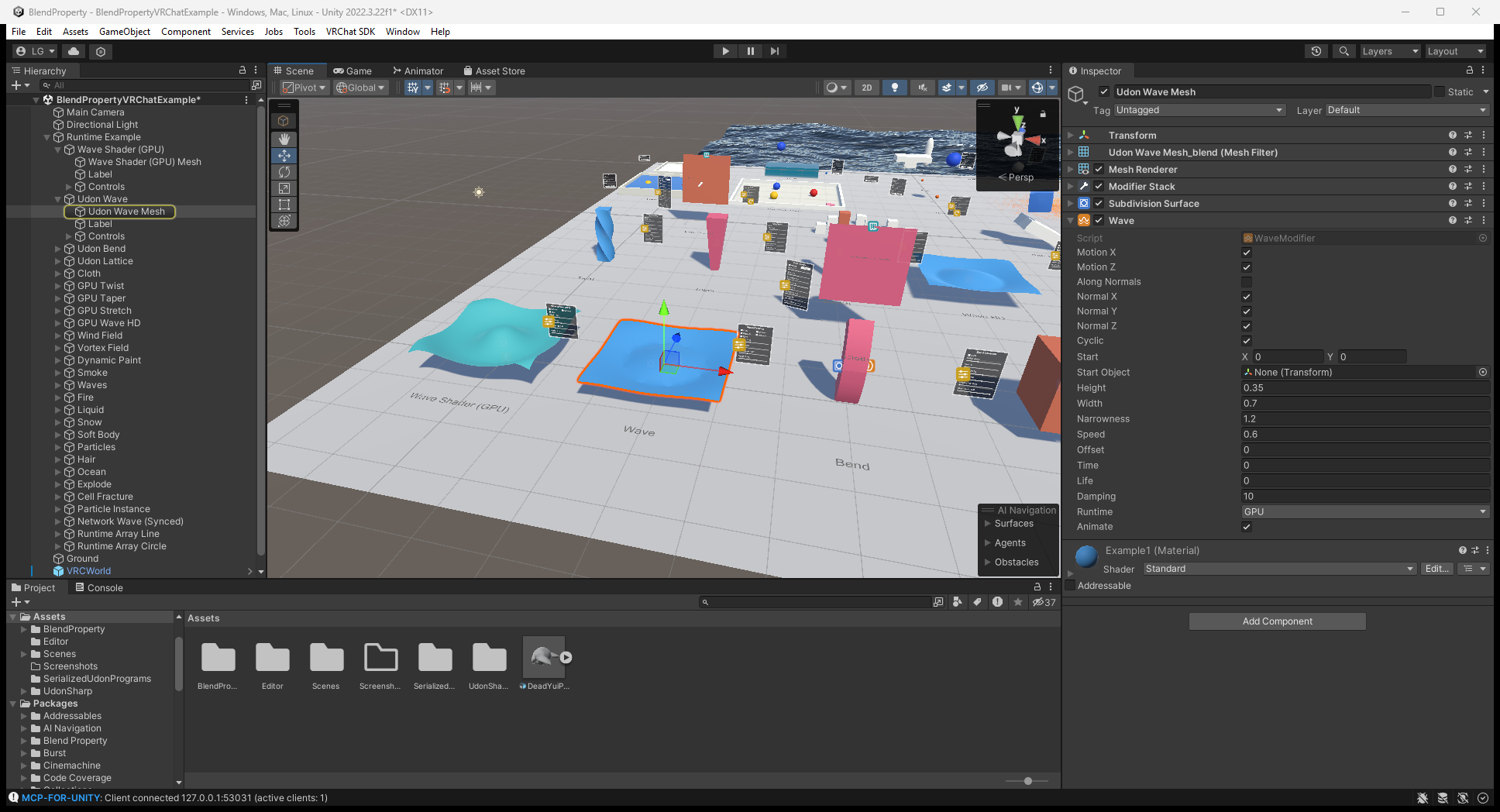
เปิด VRChat example แล้วเลือก Runtime Example/Udon Wave/Udon Wave Mesh ตรวจ Runtime: GPU ของ Wave ภาพแรกเป็นการตั้งค่าใน Editor มี Height และ Speed ให้เทียบ
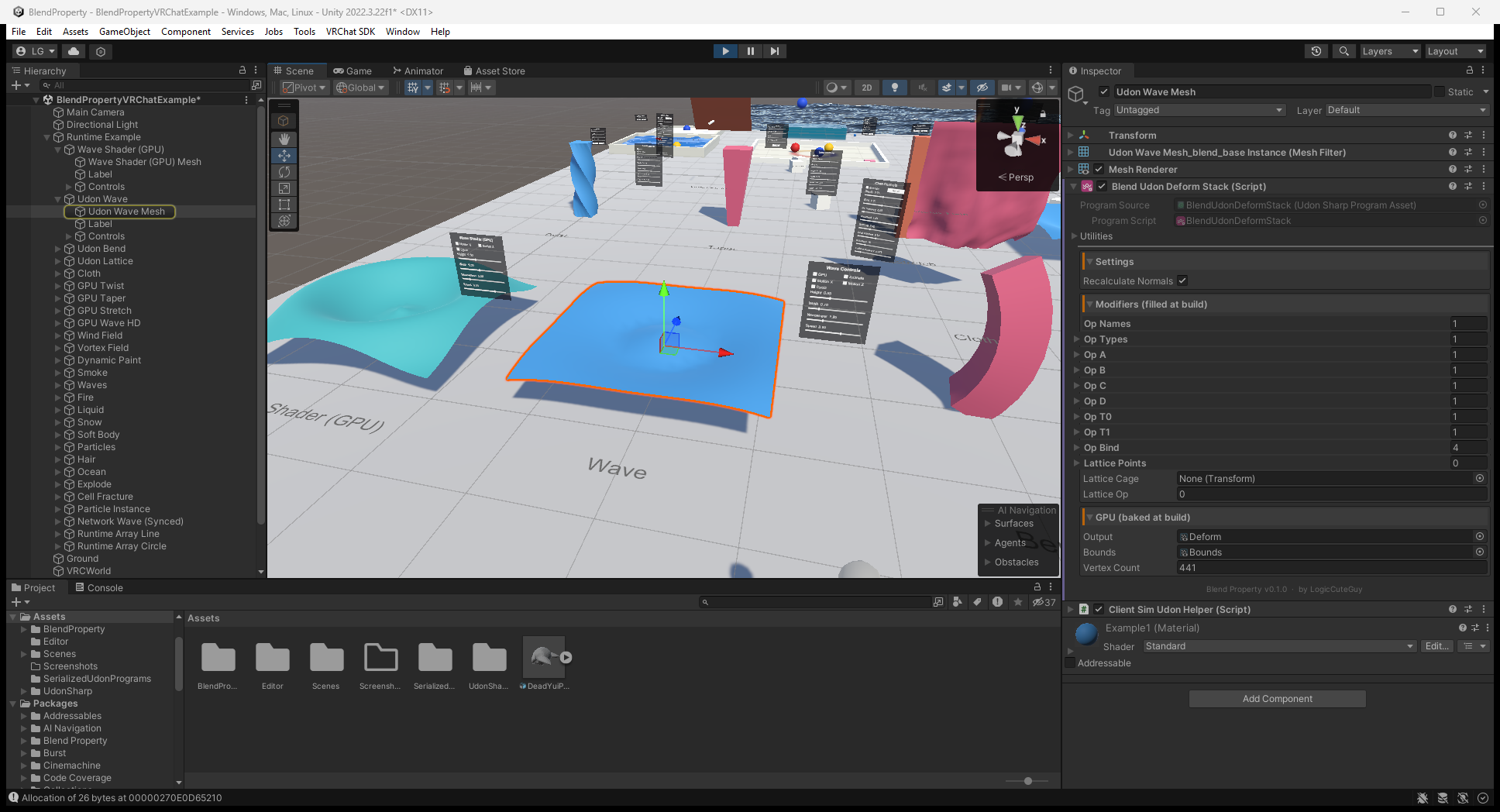
ภาพ ClientSim จากคู่มือต้นทางด้านล่างแสดง Blend Udon Deform Stack ที่สร้างเมื่อเข้า Play Mode และ plane ที่ deform แล้ว ใช้ดู component หลังแปลง ไม่ใช่หลักฐานว่า sync ข้าม client หรือรองรับอุปกรณ์จริงแล้ว
Standalone ควบคุมทั้ง stack
เมื่อต้องเปลี่ยน modifier ทั่วไปด้วย C# ให้เปิด Keep at Runtime และ Read/Write ของ source mesh
var stack = GetComponent<BlendProperty.BlendModifierStack>();
stack.GetComponent<BlendProperty.ArrayModifier>().count = level + 2;
stack.RebuildNow();
แต่ละ call ประเมินทั้ง stack ลง scene-only mesh ที่ใช้ซ้ำ และอัปเดต MeshCollider ที่ใช้ผลเดิม หลีกเลี่ยง stack หนักใน Update เมื่อเปิด Keep at Runtime script จะคุมทั้ง stack และ ไม่เพิ่ม GPU deformer ซ้ำ ส่วน VRChat strip ทั้ง stack เสมอ
Runtime Array example
Line/Circle Array station ใน VRChat scene ใช้ BlendUdonRuntimeArray ตั้ง count, circle, spacing, radius แล้วเรียก Generate() เป็น CPU generator ขนาดเล็ก ไม่ใช่ Editor Array stack รองรับ readable triangle submesh เดียว, normal/UV0, ไม่เกิน 32 copy และ 65,535 output vertex, ไม่สร้าง collider Panel sync ค่าและแต่ละ client สร้าง mesh เอง เป็น workflow ของ example ไม่ใช่รายการใน Add Component menu
ตัวอย่างและการตรวจ
Example/VRChat/BlendPropertyVRChatExample.unity: GPU modifier, Array, cloth/soft body, fluid, hair, particle, paint/waves, destruction, ocean และ controlExample/Standalone/BlendPropertyStandaloneExample.unity: ตัวอย่าง rebuild ทั้ง stack; physics ร่วมใช้แบบ native standalone ได้ แต่ scene ไม่ได้คัดลอก VRChat station ทุกชุดมา- Physics/interaction: bake, material limit, input และ sync
- คู่มือ runtime พร้อมภาพ: setting, action และผลที่ควรเห็น
Stack หายใน VRChat build ให้ใช้ Runtime GPU ไม่ใช่ Keep at Runtime หากไม่มี GPU output ให้ตรวจ bake, Read/Write, อุปกรณ์และ pipeline การ build docs ไม่ใช่การทดสอบ Unity หรือ sync สอง client
0.2.0 แก้ความเข้ากันได้ของ VRChat panel โดย Control Panel และ Cloth Panel ใช้ NoVariableSync จึงอยู่ GameObject เดียวกับ Synced Control Panel ที่เป็น Manual ได้ พร้อมแก้ shader reference ใน baked GPU deform texture ของ example และอัปเดต VRChat scene ฟีเจอร์ GPU/native physics เดิมยังใช้ได้
ดูการตรวจ panel และ example ที่ copy ไว้เมื่ออัปเกรด