BlendProperty
ドキュメントバージョン: 0.2.0 · リリース
Blend Property (com.logiccuteguy.blendproperty) は MeshFilter を持つ Unity object に Blender 風の modifier component を追加します。上から順に適用し、Editor で preview して mesh asset に保存します。既定の build には stack ではなく Bake 済み mesh が入ります。
Unity 2022.3 以降が必要です。ProBuilder は任意で、導入済みなら bridge が有効になります。SkinnedMeshRenderer、bone、blend shape は非対応です。Modifier 一覧とRuntime/buildを参照してください。
0.2.0 の修正
0.2.0 は VRChat panel の互換性を修正します。Control Panel と Cloth Panel は NoVariableSync を使用し、Manual の Synced Control Panel と同じ GameObject に置けます。Example の Bake 済み GPU deform texture の shader 参照と VRChat scene も更新します。既存の GPU/native physics は引き続き利用できます。
0.1.1 の更新
0.1.1 は live GPU modifier、cloth/soft body、fluid、hair、particle、paint/waves、destruction、ocean、interaction を追加します。Worlds SDK なしでも共通 component が native 動作します。Array/Curve は任意の Unity Splines、Array は Split Copies/Collider Per Copy に対応します。Control の同期と GPU simulation 全状態の同期は別です。Runtime/buildと Physics/materialを参照してください。
インストール
Window > Package Manager > + > Add package from git URL に入力します。
https://github.com/LogicCuteGuy/BlendProperty.git#v0.2.0
ほかに tag repository を Packages/com.logiccuteguy.blendproperty に配置するか、release の com.logiccuteguy.blendproperty-0.2.0.zip をその folder に展開します。package.json は package の直下に置きます。
VCC/ALCOM: LogicCuteGuy VPM リスト (https://vpm.logiccuteguy.com/index.json) を追加/更新し、Blend Property 0.2.0 を project に追加します。Listing は GitHub Releases と同じ名前付き ZIP を配布します。Dependency は com.unity.ugui 1.0.0 です。VRChat runtime deformer は Worlds SDK と stock UdonSharp または LCGUdonSharp がある project で使います。
最初の stack
- MeshFilter を持つ primitive、FBX の mesh child、ProBuilder object を選択します。
- Add Component > Blend Property > Modifiers の Generate / Deform / Edit / Normals から追加します。最初の modifier で Modifier Stack も追加されます。
- Header を drag、または ⋮ の Move Up/Down / Move to First/Last で順序を変更します。
- Checkbox で modifier を切り替えます。Stack を無効にすると元 mesh を表示します。
- Stack の Shading を Smooth By Angle / Smooth / Flat / Keep Imported に設定します。
Rebuild は source mesh 変更後の再評価です。⋮ の Apply はその modifier と上の有効 modifier を source に Bake します。Apply All は全体を Bake して modifier を削除します。Remove All は適用せず元 mesh に戻し、一回の Undo で戻せます。GameObject > Blend Property > Modifiers > Apply All in Children / Remove All in Children は model 全体に作用します。
結果は Assets/BlendProperty/Baked/ に保存されます。MeshFilter が参照している asset は保持してください。Tools > Blend Property > Delete Unused Baked Meshes は未使用の結果を削除します。
Editor の操作画面
Mesh を選択し、Inspector の Modifier Stack を確認します。左が元の cube、右が Bevel の結果です。Stack に Add Modifier / Apply All / Remove All / Rebuild があります。
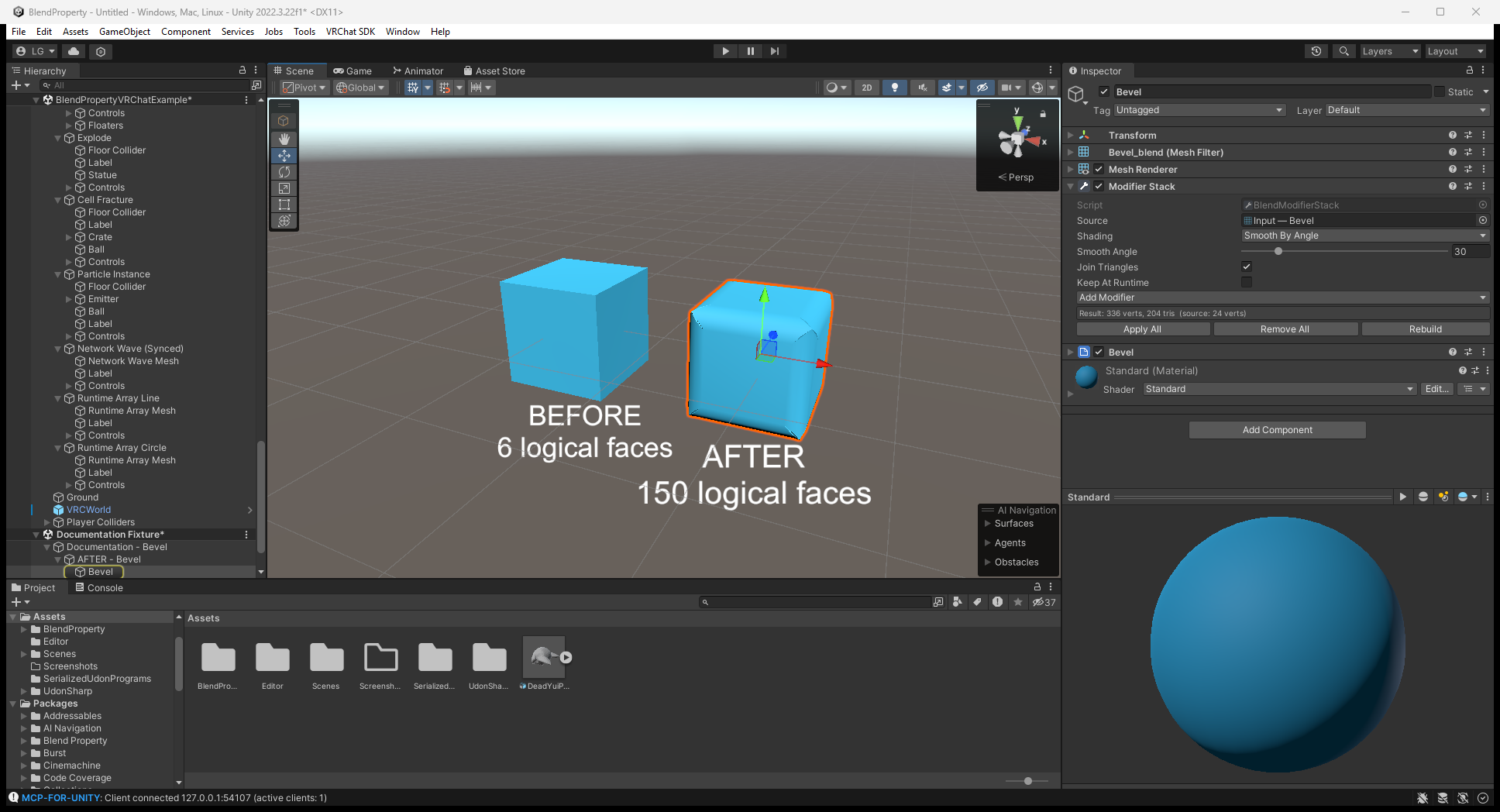
原寸画像を開く。画像はtag 固定の元ガイドから再利用しています。Inspector 内の version 表記が 0.2.0 より古い場合があります。以下では Editor 設定と local ClientSim の結果を区別します。
サンプル
Example/ 内の scene | 内容 |
|---|---|
BlendPropertyExample.unity | 十の Editor stack(Unity Splines example 二つを含む): Bevel/Subdivision、line/circle Array、Simple Deform、Wave、Boolean、Wireframe、Lattice |
VRChat/BlendPropertyVRChatExample.unity | GPU modifier、physics station、Runtime Array、共有 panel。VRChat project 用 |
Standalone/BlendPropertyStandaloneExample.unity | RebuildNow() による Array count/Twist angle。VRChat SDK なしの project 用 |
Editor example は Bake mesh を含まず、初回 open 時に再構築して保存します。Git package 内を編集する場合は、read-only file へ保存する前に example folder を Assets に copy してください。異なる project 用 runtime scene では missing script が表示されることがあります。
ProBuilder
Shape 編集中も stack が有効です。Vertex/edge/face 選択は未変形 cage を表示し、Apply は結果を ProBuilderMesh に書き戻すため編集可能です。
ソースとライセンス
Repository · バージョン固定 user guide · MIT license
最初の modifier 後は stack の Add Modifier button から Generate / Deform / Edit / Normals を選べます。Physics は Blend Property > Physics > Physics Tab。Physicsと画像付き workflowを参照してください。